
Mobile reference tools
Professional tools for complex compliance work.
Source-driven mobile references that make dense U.S. trade requirements easier to navigate, research, and verify, with authoritative sources close at hand.
Focused reference and research tools. Independent of government agencies.
ITAR Field Guide
Available on iOS and AndroidAvailable now · iOS and Android
ITAR Field Guide
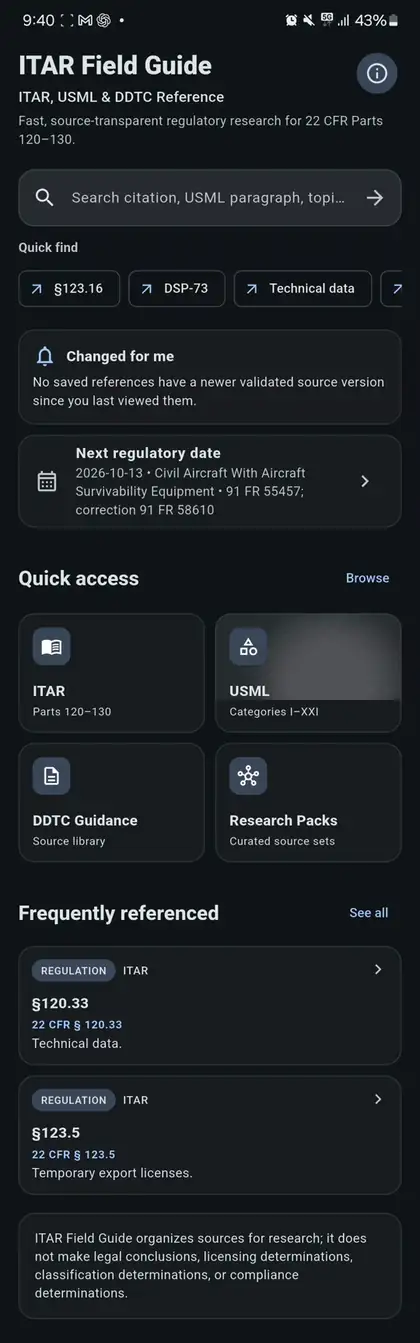
Find the ITAR and U.S. Munitions List material you need, save useful references, and move from an organized research view to the underlying source.
Move through dense material faster.
Search and navigate the ITAR, USML, and DDTC sources from one focused mobile reference.
Keep useful references close.
Save bookmarks and return to recently viewed material on your device.
Verify against the authority.
Follow citations and official-source links when the detail matters.

The portfolio
Focused guides. A consistent research workflow.
Use the reference that fits the issue at hand. Each Field Guide covers a defined subject while keeping source identity and practical navigation in view.
Available on iOS & AndroidITAR Field Guide
International Traffic in Arms Regulations, U.S. Munitions List and DDTC source research.
Explore guide In development
EAR Field Guide
Export Administration Regulations and Commerce Control List research.
View planned scope In development
USMIL Field Guide
U.S. Munitions Import List and 27 CFR Part 447 source research.
View planned scope Planned
Customs Field Guide
U.S. customs, import entry, documentation and CBP research.
View planned scopeA consistent Field Guide workflow.
Each guide focuses on a defined source set. Familiar navigation and clear source labels keep the research process consistent as you move between subjects.
ITAR Field Guide is available now. Planned guides will follow the same approach as their scope and features are confirmed.
Trust & sourcing
Clear about what the source says—and what TradeApps adds.
Regulations, agency guidance, and TradeApps-generated organization are labeled and handled as distinct things. TradeApps prioritizes authoritative U.S. Government material and links visitors to the underlying sources.
How sources are selected and presentedTradeApps is an independent software developer. Its products are reference and productivity tools, not legal advice or definitive compliance determinations, and are not affiliated with or endorsed by a U.S. Government agency.
ITAR Field Guide · Available on iOS and Android
Start with a more usable ITAR reference.
Free to download. A subscription is required for app access. Google Play: $24.99/year U.S.; Apple App Store pricing is shown at checkout.
